Interactive computing with Mahuika OnDemand
Overview
OnDemand empowers students, researchers, and industry professionals with remote and interactive web access to the HPC platforms.
Connecting to OnDemand
Prerequisite
Requires an account.
Connect to OnDemand: https://ondemand.nesi.org.nz.
For more information see the How-to guide.
Interactive applications
A number of interactive applications can be accessed through OnDemand, including:
- JupyterLab
- RStudio
- VS Code
- Virtual desktop
- MATLAB - currently under development, let us know if this is of interest
Running Jobs from OnDemand
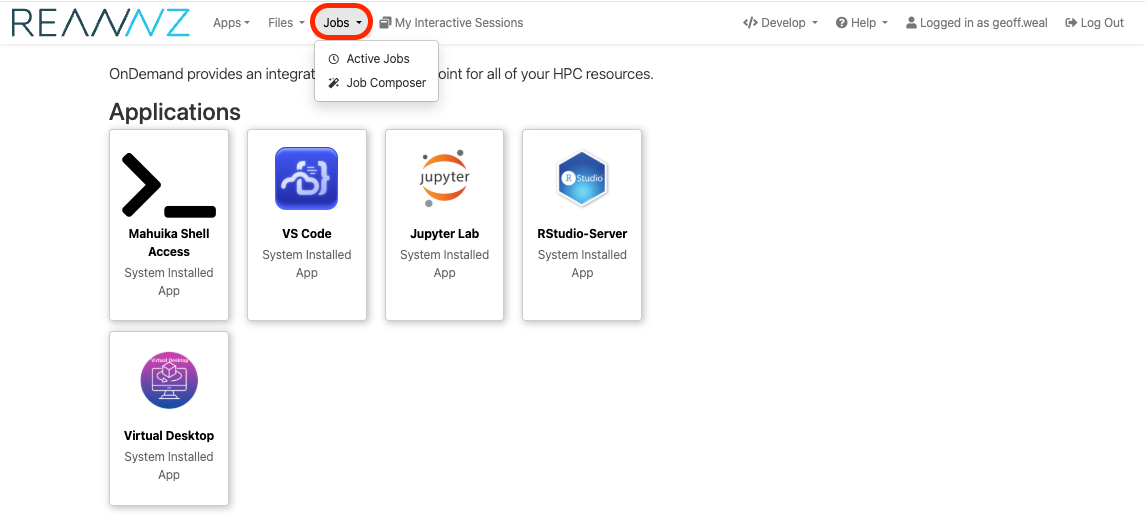
It is possible to create and submit jobs to slurm interactively from Mahuika using the Jobs section of Mahuika OnDemand. The Jobs section of Mahuika OnDemand can be found in the top right of the screen, as circled in red in the image below. There are two subsections that you can choose to use:
Active Jobs: This allows you to see and interactive with your active jobs.Job Composer: This allows you to craft submit scripts for submitting to slurm.
Changes from Jupyter on Mahuika
- JupyterLab is no longer the main user interface but is just another application to be launched via the OnDemand interface
- RStudio, MATLAB and Virtual Desktop applications are accessed directly from OnDemand instead of via JupyterLab
Known Issues
A list of known issues and limitations with OnDemand, can be found on this page
Release notes
Release notes can be found here.
Acknowledgements
We acknowledge the work of the Open OnDemand team in providing the underlying platform used for this service, as described in the following paper: