NUMA Domains
Inside a Mahuika node, some of the memory is closer to some of the cores than the rest. If a job's work and its data end up far apart, the job can run slower than it should, and its runtime can change from one run to the next.
Near and far memory
A node's cores do the calculations, and its memory holds the data they work on. A core has to fetch each number from memory before it can use it, and how long that takes depends on where the data is. A program that uses several cores runs one thread or MPI task on each (see Parallel Computing), and Slurm decides which cores and memory your job gets.
Picture a node as two buildings joined by a footbridge. Each building has four labs, and each lab has a few scientists and a fridge full of samples. The scientists are the cores, and the fridges are the memory.
A scientist who needs a sample gets it fastest from the fridge in their own lab. Fetching one from a lab down the corridor takes longer, and fetching one from the other building, across the footbridge, takes longest of all.
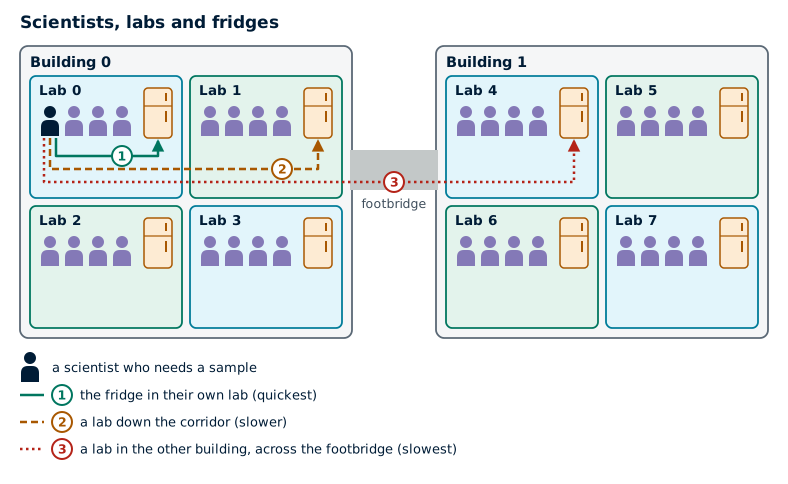
In a node, each lab is a NUMA domain: a group of cores along with the part of the memory closest to them. NUMA is short for non-uniform memory access, which means that some memory takes longer to reach than other memory.
NUMA domains on Mahuika
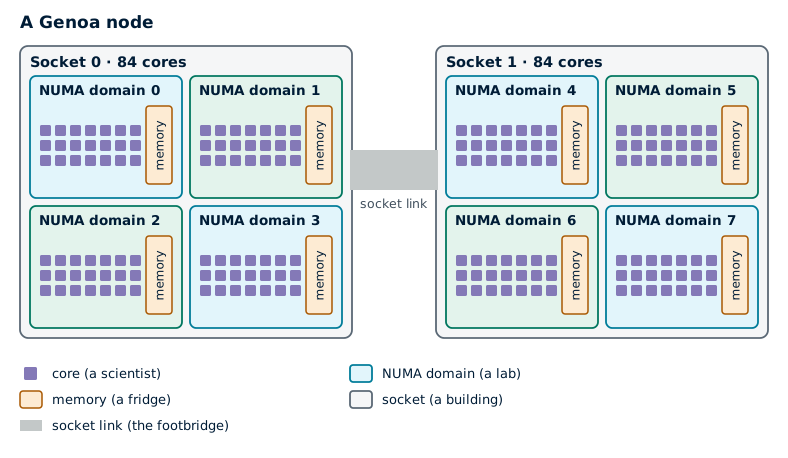
A real node is laid out the same way. The two buildings are the node's two sockets, each holding one processor chip, and the link between the sockets does the job of the footbridge.
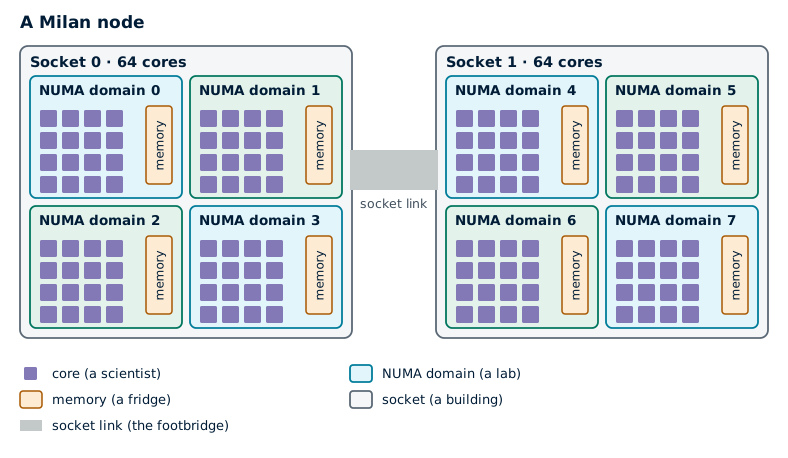
Milan nodes are split the same way, with fewer cores in each NUMA domain.
The memory is shared out evenly between a node's NUMA domains. The table below lists every type of node. Hardware has more about each one.
| Partition | GPUs | Cores | Memory | NUMA domains | Cores per domain | Memory per domain |
|---|---|---|---|---|---|---|
genoa | - | 168 (166) | 358 GB | 8 | 21 (19) | 45 GB |
genoa | 2 x RTX PRO 6000 | 168 (166) | 717 GB | 8 | 21 (20) | 90 GB |
genoa | - | 168 (166) | 1.4 TB | 8 | 21 (19) | 179 GB |
genoa | 2 x H100 | 168 (166) | 1.4 TB | 8 | 21 (19) | 179 GB |
genoa | 4 x L4 | 168 (166) | 1.4 TB | 8 | 21 (19) | 179 GB |
milan | 4 x A100 (a100_80gb) | 64 (62) | 480 GB | 4 | 16 (15) | 120 GB |
milan | - | 128 (126) | 480 GB | 8 | 16 (15) | 60 GB |
milan | 3 x A100 (a100_40gb) | 48 (46) | 480 GB | 8 | 6 (4) | 60 GB |
milan | - | 128 (126) | 992 GB | 8 | 16 (15) | 124 GB |
hugemem | - | 40 (38) | 1.4 TB | 2 | 20 (18) | 717 GB |
hugemem | - | 88 (86) | 5.8 TB | 4 | 22 (20) | 1.5 TB |
Memory is what jobs can use, which is a little less than the memory installed, as some is kept back for the operating system. Slurm also keeps a few cores on each node for the system. They come out of one or two NUMA domains, which then have fewer cores for jobs. The numbers in brackets are the cores jobs can use: in the whole node, and in the NUMA domain with the fewest.
Your desktop and Mahuika
You've probably never had to think about NUMA domains on your own desktop or laptop. Most of them have one processor, and all of their memory is the same distance from every core.
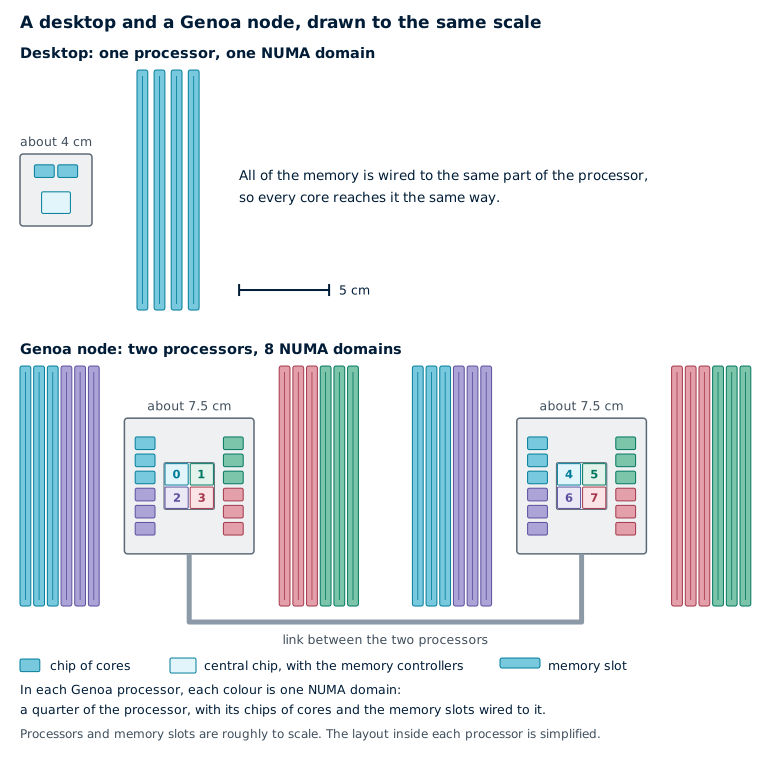
Mahuika's nodes are different in a few ways that can make NUMA domains matter.
- They're physically much bigger. A Genoa node has two large processors with 168 cores between them. The memory slots surround each processor, and each slot is wired to the part of the processor on its side, so the cores on that side reach it fastest. Memory attached to the other processor is further still, as data from it has to cross the link between the two processors. Every extra step on the way adds a little time.
- You often share them. Unless your job uses a whole node, other people's jobs run on the rest of it. Slurm gives your job cores from whatever is free, and they can end up spread over several NUMA domains.
- Jobs run for much longer, and their time is counted. If a job runs 20% slower than it could, a one-minute program on your laptop finishes 12 seconds later, but a two-day job on Mahuika finishes nearly ten hours later and uses more of your project's allocation.
When NUMA domains matter
Even on Mahuika, most jobs never need to think about NUMA domains. They make a difference for programs that run many threads or MPI tasks and move a lot of data in and out of memory. These jobs usually lose time in one of two ways.
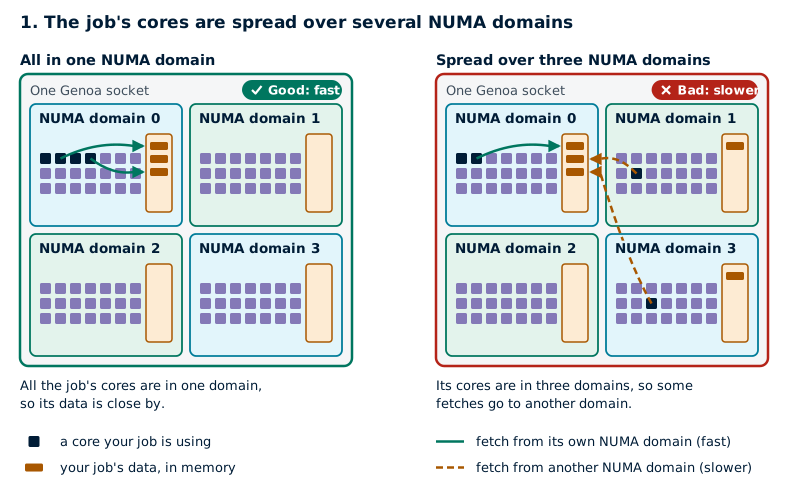
The first is when the job's cores are spread over several NUMA domains. Linux stores each piece of data in the memory of the NUMA domain whose core first uses it, so the job's data ends up spread over the memory of several domains. Whenever a core needs data that's stored in another domain, the fetch takes longer. Slurm doesn't guarantee that a job's cores are all in one NUMA domain, even when they would fit in one.
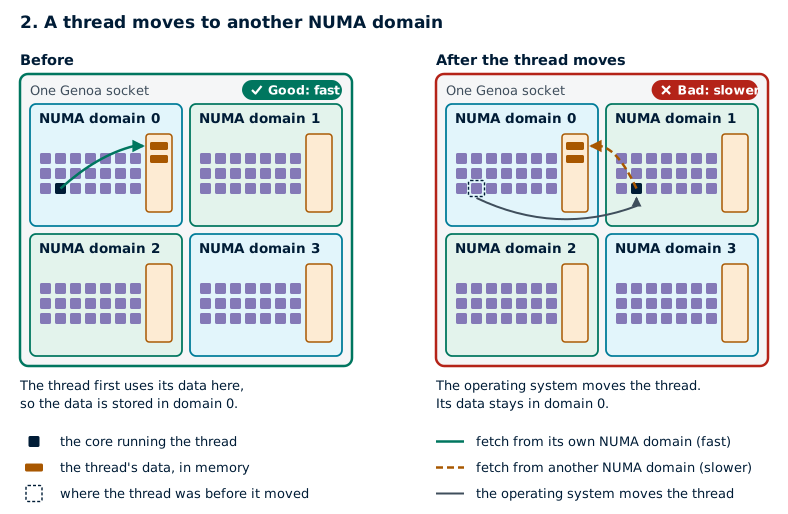
The second is when a thread moves. To keep all of your job's cores evenly busy, the operating system can move a thread from one core to another. If the new core is in another NUMA domain, the thread's data stays behind in the old domain's memory. From then on, every fetch of that data comes from another domain's memory.
If your job's runtime changes a lot between runs with the same input, one of these may be the reason.
Check a job's NUMA domains
To see which cores each task of your job is using, and which NUMA domains they're in, put this command in your batch script before the line that runs your program:
srun --job-name=print_binding_stats bash -c "echo -e \"Task #\${SLURM_PROCID} is running on node \$(hostname).\n\$(hostname) has the following NUMA configuration:\n\$(lscpu | grep -i --color=none numa)\nTask #\${SLURM_PROCID} has \$(nproc) CPUs, their core IDs are \$(taskset -c -p \$\$ | awk '{print \$NF}')\n===========================================\""
Each task prints a report like this one, from a task on a Genoa node:
Task #0 is running on node c001.
c001 has the following NUMA configuration:
NUMA node(s):                            8
NUMA node0 CPU(s):                       0-20,168-188
NUMA node1 CPU(s):                       21-41,189-209
NUMA node2 CPU(s):                       42-62,210-230
NUMA node3 CPU(s):                       63-83,231-251
NUMA node4 CPU(s):                       84-104,252-272
NUMA node5 CPU(s):                       105-125,273-293
NUMA node6 CPU(s):                       126-146,294-314
NUMA node7 CPU(s):                       147-167,315-335
Task #0 has 4 CPUs, their core IDs are 8-11
===========================================
In this report, a CPU is a core, and a NUMA node is a NUMA domain, not a whole node.
- The
NUMA nodelines list the cores in each NUMA domain. For example, NUMA domain 0 has cores 0 to 20. The numbers 168 to 188 are the same 21 cores again, as each core can run two threads at once (see Simultaneous Multithreading). - The last line lists the cores the task can use, here cores 8 to 11.
To find a task's NUMA domains, look for its cores in the NUMA node lines.
Cores 8 to 11 are all in NUMA domain 0, so this task is in one NUMA domain.
A task with cores 19 to 22 would be spread over two:
cores 19 and 20 are in NUMA domain 0, and cores 21 and 22 are in NUMA domain 1.
Keep jobs in a NUMA domain
The example batch scripts below keep each task's work close to its data. What the options mean explains the options they use, and OpenMP Settings and Thread Placement and Thread Affinity go into more detail.
Sockets in Slurm
On Mahuika, Slurm treats each NUMA domain as a socket, so it shows a Genoa node as 8 sockets of 21 cores rather than 2 sockets. When a Slurm option or Slurm's output mentions sockets, it means NUMA domains.
A Genoa node has 8 NUMA domains of 21 cores. The GPUs are in NUMA domains 1 and 7 (RTX PRO 6000), 5 and 7 (H100), or 1, 3, 5 and 7 (L4).
#!/bin/bash -e

#SBATCH --job-name         numa-mpi
#SBATCH --account          nesi99991
#SBATCH --time             01:00:00
#SBATCH --partition        genoa
#SBATCH --ntasks           8
#SBATCH --cpus-per-task    1
#SBATCH --mem-per-cpu      2G
#SBATCH --cores-per-socket 21
#SBATCH --threads-per-core 1
#SBATCH --distribution     *:block:*
#SBATCH --mem-bind         local

export OMP_PROC_BIND=true
export OMP_PLACES=cores

srun --job-name=print_binding_stats bash -c "echo -e \"Task #\${SLURM_PROCID} is running on node \$(hostname).\n\$(hostname) has the following NUMA configuration:\n\$(lscpu | grep -i --color=none numa)\nTask #\${SLURM_PROCID} has \$(nproc) CPUs, their core IDs are \$(taskset -c -p \$\$ | awk '{print \$NF}')\n===========================================\""

srun MY_PROGRAM
#!/bin/bash -e

#SBATCH --job-name         numa-mpi
#SBATCH --account          nesi99991
#SBATCH --time             01:00:00
#SBATCH --partition        genoa
#SBATCH --ntasks           8
#SBATCH --cpus-per-task    1
#SBATCH --mem-per-cpu      8G
#SBATCH --cores-per-socket 21
#SBATCH --threads-per-core 1
#SBATCH --distribution     *:block:*
#SBATCH --mem-bind         local

export OMP_PROC_BIND=true
export OMP_PLACES=cores

srun --job-name=print_binding_stats bash -c "echo -e \"Task #\${SLURM_PROCID} is running on node \$(hostname).\n\$(hostname) has the following NUMA configuration:\n\$(lscpu | grep -i --color=none numa)\nTask #\${SLURM_PROCID} has \$(nproc) CPUs, their core IDs are \$(taskset -c -p \$\$ | awk '{print \$NF}')\n===========================================\""

srun MY_PROGRAM
#!/bin/bash -e

#SBATCH --job-name         numa-gpu
#SBATCH --account          nesi99991
#SBATCH --time             01:00:00
#SBATCH --gpus-per-node    pro_6000:1
#SBATCH --ntasks           8
#SBATCH --cpus-per-task    1
#SBATCH --mem-per-cpu      4G
#SBATCH --cores-per-socket 21
#SBATCH --threads-per-core 1
#SBATCH --distribution     *:block:*
#SBATCH --mem-bind         local
#SBATCH --gres-flags       enforce-binding
#SBATCH --gpu-bind         closest

export OMP_PROC_BIND=true
export OMP_PLACES=cores

srun --job-name=print_binding_stats bash -c "echo -e \"Task #\${SLURM_PROCID} is running on node \$(hostname).\n\$(hostname) has the following NUMA configuration:\n\$(lscpu | grep -i --color=none numa)\nTask #\${SLURM_PROCID} has \$(nproc) CPUs, their core IDs are \$(taskset -c -p \$\$ | awk '{print \$NF}')\n===========================================\""

srun MY_PROGRAM
#!/bin/bash -e

#SBATCH --job-name         numa-gpu
#SBATCH --account          nesi99991
#SBATCH --time             01:00:00
#SBATCH --gpus-per-node    h100:1
#SBATCH --ntasks           8
#SBATCH --cpus-per-task    1
#SBATCH --mem-per-cpu      8G
#SBATCH --cores-per-socket 21
#SBATCH --threads-per-core 1
#SBATCH --distribution     *:block:*
#SBATCH --mem-bind         local
#SBATCH --gres-flags       enforce-binding
#SBATCH --gpu-bind         closest

export OMP_PROC_BIND=true
export OMP_PLACES=cores

srun --job-name=print_binding_stats bash -c "echo -e \"Task #\${SLURM_PROCID} is running on node \$(hostname).\n\$(hostname) has the following NUMA configuration:\n\$(lscpu | grep -i --color=none numa)\nTask #\${SLURM_PROCID} has \$(nproc) CPUs, their core IDs are \$(taskset -c -p \$\$ | awk '{print \$NF}')\n===========================================\""

srun MY_PROGRAM
#!/bin/bash -e

#SBATCH --job-name         numa-gpu
#SBATCH --account          nesi99991
#SBATCH --time             01:00:00
#SBATCH --gpus-per-node    l4:1
#SBATCH --ntasks           8
#SBATCH --cpus-per-task    1
#SBATCH --mem-per-cpu      8G
#SBATCH --cores-per-socket 21
#SBATCH --threads-per-core 1
#SBATCH --distribution     *:block:*
#SBATCH --mem-bind         local
#SBATCH --gres-flags       enforce-binding
#SBATCH --gpu-bind         closest

export OMP_PROC_BIND=true
export OMP_PLACES=cores

srun --job-name=print_binding_stats bash -c "echo -e \"Task #\${SLURM_PROCID} is running on node \$(hostname).\n\$(hostname) has the following NUMA configuration:\n\$(lscpu | grep -i --color=none numa)\nTask #\${SLURM_PROCID} has \$(nproc) CPUs, their core IDs are \$(taskset -c -p \$\$ | awk '{print \$NF}')\n===========================================\""

srun MY_PROGRAM
Milan compute and large memory nodes have 8 NUMA domains of 16 cores.
The A100 80 GB nodes have one processor, split into 4 NUMA domains of 16 cores, with a GPU in each one.
The A100 40 GB nodes have 8 NUMA domains of 6 cores, with GPUs in NUMA domains 2, 5 and 6.
In the A100 batch scripts, --constraint picks the 80 GB or 40 GB nodes.
The A100 40 GB batch script starts 6 tasks, as that's all a NUMA domain on those nodes can hold.
#!/bin/bash -e

#SBATCH --job-name         numa-mpi
#SBATCH --account          nesi99991
#SBATCH --time             01:00:00
#SBATCH --partition        milan
#SBATCH --ntasks           8
#SBATCH --cpus-per-task    1
#SBATCH --mem-per-cpu      4G
#SBATCH --cores-per-socket 16
#SBATCH --threads-per-core 1
#SBATCH --distribution     *:block:*
#SBATCH --mem-bind         local

export OMP_PROC_BIND=true
export OMP_PLACES=cores

srun --job-name=print_binding_stats bash -c "echo -e \"Task #\${SLURM_PROCID} is running on node \$(hostname).\n\$(hostname) has the following NUMA configuration:\n\$(lscpu | grep -i --color=none numa)\nTask #\${SLURM_PROCID} has \$(nproc) CPUs, their core IDs are \$(taskset -c -p \$\$ | awk '{print \$NF}')\n===========================================\""

srun MY_PROGRAM
#!/bin/bash -e

#SBATCH --job-name         numa-mpi
#SBATCH --account          nesi99991
#SBATCH --time             01:00:00
#SBATCH --partition        milan
#SBATCH --ntasks           8
#SBATCH --cpus-per-task    1
#SBATCH --mem-per-cpu      8G
#SBATCH --cores-per-socket 16
#SBATCH --threads-per-core 1
#SBATCH --distribution     *:block:*
#SBATCH --mem-bind         local

export OMP_PROC_BIND=true
export OMP_PLACES=cores

srun --job-name=print_binding_stats bash -c "echo -e \"Task #\${SLURM_PROCID} is running on node \$(hostname).\n\$(hostname) has the following NUMA configuration:\n\$(lscpu | grep -i --color=none numa)\nTask #\${SLURM_PROCID} has \$(nproc) CPUs, their core IDs are \$(taskset -c -p \$\$ | awk '{print \$NF}')\n===========================================\""

srun MY_PROGRAM
#!/bin/bash -e

#SBATCH --job-name         numa-gpu
#SBATCH --account          nesi99991
#SBATCH --time             01:00:00
#SBATCH --gpus-per-node    a100:1
#SBATCH --constraint       a100_80gb
#SBATCH --ntasks           8
#SBATCH --cpus-per-task    1
#SBATCH --mem-per-cpu      8G
#SBATCH --cores-per-socket 16
#SBATCH --threads-per-core 1
#SBATCH --distribution     *:block:*
#SBATCH --mem-bind         local
#SBATCH --gres-flags       enforce-binding
#SBATCH --gpu-bind         closest

export OMP_PROC_BIND=true
export OMP_PLACES=cores

srun --job-name=print_binding_stats bash -c "echo -e \"Task #\${SLURM_PROCID} is running on node \$(hostname).\n\$(hostname) has the following NUMA configuration:\n\$(lscpu | grep -i --color=none numa)\nTask #\${SLURM_PROCID} has \$(nproc) CPUs, their core IDs are \$(taskset -c -p \$\$ | awk '{print \$NF}')\n===========================================\""

srun MY_PROGRAM
#!/bin/bash -e

#SBATCH --job-name         numa-gpu
#SBATCH --account          nesi99991
#SBATCH --time             01:00:00
#SBATCH --gpus-per-node    a100:1
#SBATCH --constraint       a100_40gb
#SBATCH --ntasks           6
#SBATCH --cpus-per-task    1
#SBATCH --mem-per-cpu      8G
#SBATCH --cores-per-socket 6
#SBATCH --threads-per-core 1
#SBATCH --distribution     *:block:*
#SBATCH --mem-bind         local
#SBATCH --gres-flags       enforce-binding
#SBATCH --gpu-bind         closest

export OMP_PROC_BIND=true
export OMP_PLACES=cores

srun --job-name=print_binding_stats bash -c "echo -e \"Task #\${SLURM_PROCID} is running on node \$(hostname).\n\$(hostname) has the following NUMA configuration:\n\$(lscpu | grep -i --color=none numa)\nTask #\${SLURM_PROCID} has \$(nproc) CPUs, their core IDs are \$(taskset -c -p \$\$ | awk '{print \$NF}')\n===========================================\""

srun MY_PROGRAM
The hugemem nodes cl18 and cl19 have 2 NUMA domains of 20 cores.
#!/bin/bash -e

#SBATCH --job-name         numa-mpi
#SBATCH --account          nesi99991
#SBATCH --time             01:00:00
#SBATCH --partition        hugemem
#SBATCH --ntasks           8
#SBATCH --cpus-per-task    1
#SBATCH --mem-per-cpu      30G
#SBATCH --cores-per-socket 20
#SBATCH --threads-per-core 1
#SBATCH --distribution     *:block:*
#SBATCH --mem-bind         local

export OMP_PROC_BIND=true
export OMP_PLACES=cores

srun --job-name=print_binding_stats bash -c "echo -e \"Task #\${SLURM_PROCID} is running on node \$(hostname).\n\$(hostname) has the following NUMA configuration:\n\$(lscpu | grep -i --color=none numa)\nTask #\${SLURM_PROCID} has \$(nproc) CPUs, their core IDs are \$(taskset -c -p \$\$ | awk '{print \$NF}')\n===========================================\""

srun MY_PROGRAM
What the options mean
These options and variables keep each task, its threads and its memory in one NUMA domain.
--cores-per-socketonly lets the job run on nodes whose NUMA domains have at least this many cores. It only limits which nodes the job can use, and doesn't change how many cores it gets.--threads-per-core 1gives each task a core of its own, without Simultaneous Multithreading.--distribution *:block:*puts tasks on cores next to each other, and fills one NUMA domain before starting on the next. Without it, Slurm puts each task in the next NUMA domain in turn.--mem-bind localkeeps each task's memory in its own NUMA domain.OMP_PROC_BIND=truepins each thread, so the operating system can't move it to another core or NUMA domain.OMP_PLACES=corespins each thread to a whole core. These two only matter if you give each task more than one core with--cpus-per-task, as Slurm setsOMP_NUM_THREADSto that number.
The GPU batch scripts ask for one GPU. These options keep the tasks next to their GPU:
--gres-flags enforce-bindingonly gives the job cores in the NUMA domain its GPU is attached to. The job may wait longer to start.--gpu-bind closestgives each task the GPU in its own NUMA domain.