NUMA Domains
Inside a Mahuika node, some of the memory is closer to some of the cores than the rest. If a job's work and its data end up far apart, the job can run slower than it should, and its runtime can change from one run to the next.
Cores and memory
Mahuika is made up of many nodes (individual computers). Your job runs on one or more of them.
The two parts of a node that matter here are its cores and its memory. Cores do the calculations. Memory holds the data the cores are working on. A core has to fetch each number from memory before it can use it.
To use more than one core at once, a program splits its work into pieces. A multithreaded program, such as one that uses OpenMP, runs several threads. An MPI program runs several tasks, and these can be spread across more than one node. Each thread or task runs on its own core.
When you submit a job, you ask Slurm for some cores and some memory, and Slurm decides which ones you get.
Near and far memory
Fetching data from memory takes time, and how long depends on where the data is.
Picture a node as two buildings joined by a footbridge. Each building has four labs, and each lab has a few scientists and a fridge full of samples. The scientists are the cores, and the fridges are the memory.
A scientist who needs a sample gets it fastest from the fridge in their own lab. Fetching one from a lab down the corridor takes longer, and fetching one from the other building, across the footbridge, takes longest of all.
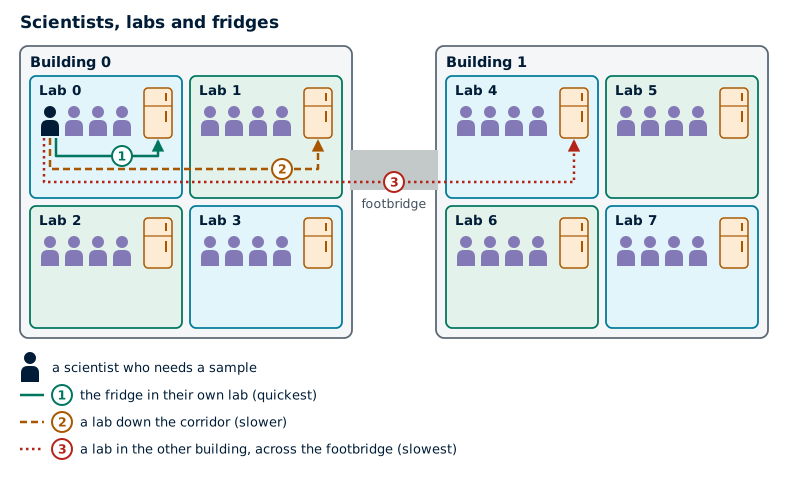
In a node, each lab is a NUMA domain: a group of cores along with the part of the memory closest to them. NUMA is short for non-uniform memory access, which means that some memory takes longer to reach than other memory.
NUMA domains on Mahuika
A real node is laid out the same way. The two buildings are the node's two sockets, each holding one processor chip, and the link between the sockets does the job of the footbridge.
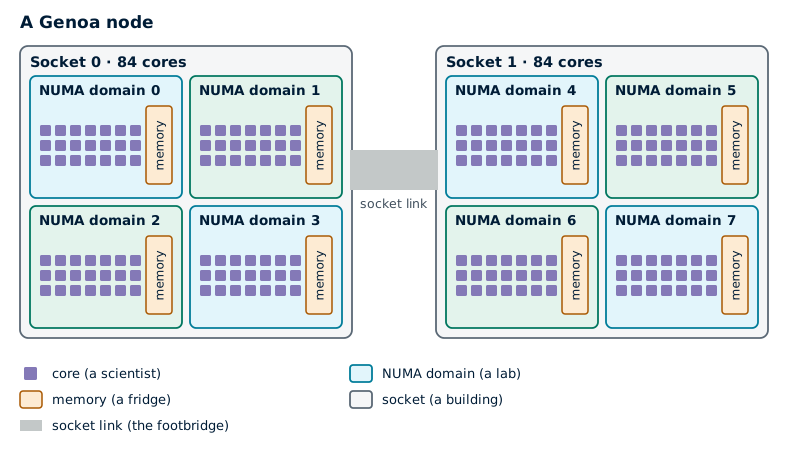
A Genoa node has 2 sockets of 84 cores. Each socket is split into 4 NUMA domains, so the node has 8 NUMA domains with 21 cores each. The memory is shared out evenly between them. On a node with 384 GB, each NUMA domain has about 47 GB, after a little is kept back for the operating system.
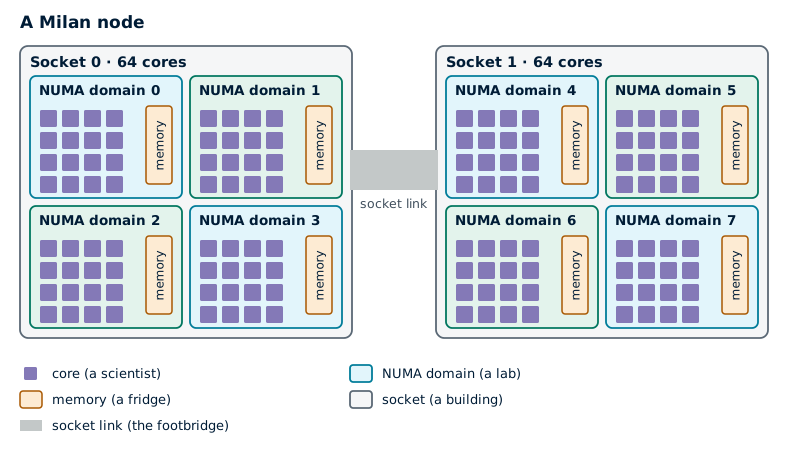
Milan nodes are split the same way, into 8 NUMA domains, but with 16 cores in each. On a Milan node with 512 GB, each NUMA domain has about 63 GB.
The table below lists every type of node. Hardware has more about each one.
| Node type | Cores | Memory | NUMA domains | Cores in each NUMA domain | Memory in each NUMA domain |
|---|---|---|---|---|---|
| 2 x AMD Genoa 9634 | 168 | 384 GB | 8 | 21 | 48 GB |
| 2 x AMD Genoa 9634 | 168 | 768 GB | 8 | 21 | 96 GB |
| 2 x AMD Genoa 9634 | 168 | 1536 GB | 8 | 21 | 192 GB |
| 2 x AMD Milan 7713 | 128 | 512 GB | 8 | 16 | 64 GB |
| 2 x AMD Milan 7713 | 128 | 1024 GB | 8 | 16 | 128 GB |
| 1 x AMD Milan 7713P, with 4 A100 GPUs | 64 | 512 GB | 4 | 16 | 128 GB |
| 2 x AMD Milan 7413, with 3 A100 GPUs | 48 | 512 GB | 8 | 6 | 64 GB |
2 x Intel Xeon Gold 6230 (hugemem) |
40 | 1.5 TB | 2 | 20 | 768 GB |
4 x Intel Xeon Gold 6238M (hugemem) |
88 | 6 TB | 4 | 22 | 1.5 TB |
The memory figures are the memory installed, as on the Hardware page. Each NUMA domain has a little less than its share available, because some is kept back for the operating system.
Your desktop and Mahuika
You've probably never had to think about NUMA domains on your own desktop or laptop. Most of them have one processor, and all of their memory is the same distance from every core. In the story, that's one small lab with one fridge, so every sample is close at hand.
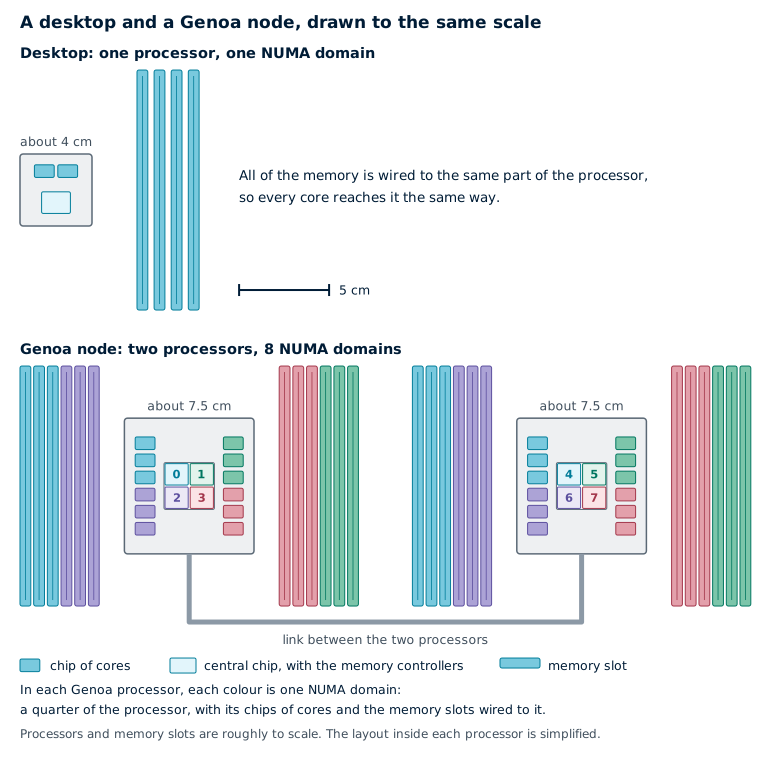
Mahuika's nodes are different in a few ways that can make NUMA domains matter.
- They're physically much bigger. A Genoa node has two large processors with 168 cores between them. The memory slots surround each processor, and each slot is wired to the part of the processor on its side, so the cores on that side reach it fastest. Memory attached to the other processor is further still, as data from it has to cross the link between the two processors. Every extra step on the way adds a little time.
- You often share them. Unless your job uses a whole node, other people's jobs run on the rest of it. Slurm gives your job cores from whatever is free, and they can end up spread over several NUMA domains.
- Jobs often run for much longer. Say a job runs 20% slower than it could. On your laptop, a program that takes a minute would finish 12 seconds later, and you'd never notice. On Mahuika, a job that takes two days would finish nearly ten hours later.
- Time on Mahuika is counted. A slower job uses more of your project's allocation, and takes longer to give you results.
When NUMA domains matter
Even on Mahuika, most jobs never need to think about NUMA domains. They make a difference for programs that run many threads or MPI tasks and move a lot of data in and out of memory. These jobs usually lose time in one of two ways.
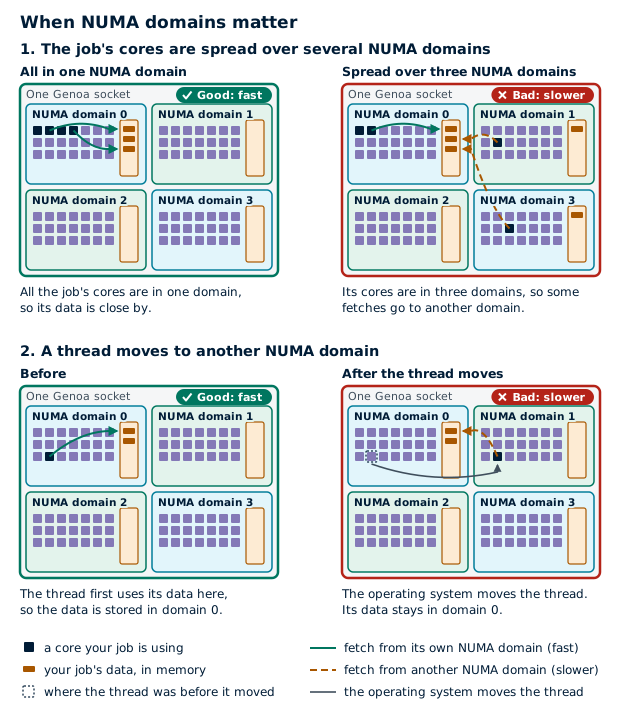
The first is when the job's cores are spread over several NUMA domains. Linux stores each piece of data in the memory of the NUMA domain whose core first uses it, so the job's data ends up spread over the memory of several domains. Whenever a core needs data that's stored in another domain, the fetch takes longer. Slurm doesn't guarantee that a job's cores are all in one NUMA domain, even when they would fit in one.
The second is when a thread moves. To keep all of your job's cores evenly busy, the operating system can move a thread from one core to another. If the new core is in another NUMA domain, the thread's data stays behind in the old domain's memory. From then on, every fetch of that data comes from another domain's memory.
If your job's runtime changes a lot between runs with the same input, one of these may be the reason.
Check a job's NUMA domains
To see which NUMA domains your job is using, put this line in your batch script before the line that runs your program:
numactl --show
In the output, physcpubind lists the cores your job can use, and nodebind lists the NUMA domains those cores are in.
If nodebind has more than one number, your job is spread over more than one NUMA domain.
For a job with several MPI tasks, run it with srun to get the lines for each task.
The --label option puts the task number at the start of each line.
srun --label numactl --show
To see which cores belong to each NUMA domain on the node, run:
lscpu | grep NUMA
Keep work near its data
The most useful thing you can do is pin your threads.
Pinning tells your program to keep each thread on the same core for the whole run,
so the thread stays in the same lab as its data.
For an OpenMP program, set OMP_PROC_BIND and OMP_PLACES as shown in OpenMP Settings.
Thread Placement and Thread Affinity goes into more detail.
If your MPI program uses whole nodes, you can also give each MPI task its own NUMA domain, with one thread for each core in it. The batch script below does this.
Example batch script: one MPI task per NUMA domain
This batch script uses a whole Genoa node.
#!/bin/bash -e

#SBATCH --job-name          numa-hybrid
#SBATCH --account           nesi99991
#SBATCH --time              01:00:00
#SBATCH --partition         genoa
#SBATCH --nodes             1
#SBATCH --ntasks            8
#SBATCH --ntasks-per-socket 1
#SBATCH --cpus-per-task     21
#SBATCH --mem               100G

export OMP_PROC_BIND=true
export OMP_PLACES=cores

srun MY_PROGRAM
Replace MY_PROGRAM with the command that runs your program.
--ntasks 8starts 8 tasks, one for each NUMA domain.--ntasks-per-socket 1stops Slurm putting more than one task in a NUMA domain.--cpus-per-task 21gives each task the 21 cores in its NUMA domain.OMP_PROC_BINDandOMP_PLACESpin each task's threads to its cores.
To run it on a Milan node, change the partition to milan and use --cpus-per-task 16.
If your job only uses part of a node, Slurm doesn't guarantee that each task's cores are in one NUMA domain.
You can check with srun --label numactl --show.
NUMA domains in Slurm
On Mahuika, Slurm (confusingly) treats each NUMA domain as a socket. So when a Slurm option or Slurm's output mentions sockets, it means NUMA domains. Slurm shows a Genoa node as 8 sockets of 21 cores, for example, rather than 2 sockets of 84.
This affects the following options.
--ntasks-per-socketis the most tasks Slurm will put in each NUMA domain. Slurm also keeps each task inside its NUMA domain.- The second part of
--distribution, such as theblockin--distribution block:block, controls how Slurm shares a job's cores between its tasks. Withblock, Slurm fills one NUMA domain before starting on the next. Withcyclic, the default, it puts each task in the next NUMA domain in turn. --sockets-per-node,--cores-per-socketand--extra-node-infoonly limit which nodes your job can run on. Each value is a minimum, and none of them changes how many cores your job gets.
The sbatch documentation has the full details of each option.